Within Easy Reach: A Bristol Shopkeeper's Audit for Card-Terminal Placement
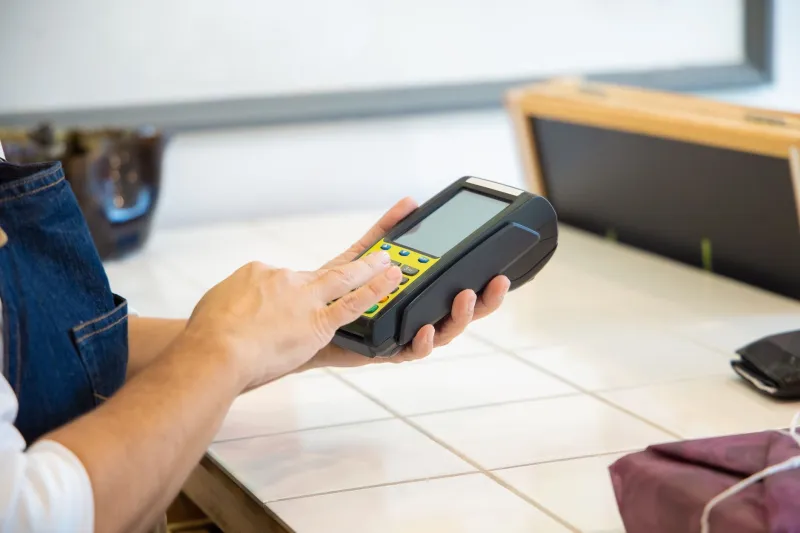
A card terminal is not simply a box on a counter. It is the point at which a customer completes a transaction, often while holding a bag, balancing a child, managing a walking aid or simply trying to keep a queue moving. In a Bristol independent, where counter space is frequently tight and layouts have grown around the building rather than the other way round, placement deserves more attention than it usually receives.
The commercial case is straightforward. A terminal that is easy to see, easy to reach and stable to use reduces hesitation, repeated instructions and failed attempts. It also allows staff to serve without twisting across hot drinks, till drawers or display stock. Inclusive payment design is sometimes framed as a compliance matter, and access duties under the Equality Act 2010 are certainly part of the picture. But the stronger argument for most shopkeepers is ordinary trading: a payment point that works for more people works better for the business.
Why the counter-height test matters
The simplest way to assess a terminal is to approach it as a customer would. Stand where the queue naturally forms. Reach for the reader without leaning over the counter, stretching sideways or moving items out of the way. Can the screen be read at a glance? Is the PIN pad stable? Does the card reader sit at an angle that invites use, or does it face the ceiling?
This test matters because difficulty is not limited to obvious accessibility needs. A customer with a wrist injury, a parent holding a buggy, an older shopper with a walking stick or someone carrying a heavy purchase may all find an awkwardly placed terminal harder to use. In a compact Bristol shop — a narrow unit on Gloucester Road, a period building in Old Market, a counter tucked into a Bedminster side street — the difference between a comfortable reach and an awkward one can be a few centimetres.
The aim is not to redesign the shop. It is to identify whether the payment point is positioned for the customer or merely for the convenience of installation.
Screen angle, glare and privacy
A terminal should generally face the person paying, not the person serving. That sounds obvious, but counters often end up with the reader angled towards staff because that was the easiest route for the cable or the most convenient spot beside the till. The customer then has to turn the device, tap at an unfamiliar angle or ask for help.
Bristol's older retail spaces bring their own lighting conditions. Large shopfront windows can create glare for much of the day; low ceilings and basement cafés can produce shadow. A slight tilt can make a significant difference. So can contrast settings and screen brightness. The test is whether the customer can see the amount and the prompt without shielding the screen with a hand.
Privacy deserves equal attention. A PIN pad should not be overlooked by the rest of the queue, and the screen should not display sensitive information to bystanders. Placement that protects the keypad while keeping the display readable is a small design decision with a disproportionate effect on confidence.
Cable routing and physical stability
Cables are the least glamorous part of payment technology and one of the most common causes of counter friction. A taut cable can pull a terminal out of position. A loose loop can catch a sleeve, a bag strap or a cleaning cloth. A connector strained by repeated movement may eventually fail at the least convenient moment.
Route cables behind the counter where possible, leaving a service loop so that the terminal can be moved for cleaning or handed to a customer without putting strain on the connection. The reader should sit flat and stable, not balanced on a narrow ledge or propped against a display. If the terminal is fixed, check that the fixing does not prevent the screen from being angled towards the customer. If it is portable, check that it has a consistent home rather than being moved between three unsuitable spots during the day.
Staff reach and queue choreography
Placement is also a question of staff movement. A terminal that sits outside the natural serving arc forces the member of staff to reach across the till, turn away from the customer or interrupt the flow of packing. Over a busy Saturday, those small movements accumulate into slower service and more mistakes.
Watch the counter during a quiet period and again during a rush. Where does the member of staff naturally stand? Where are their hands when the transaction ends? The terminal should be within that working zone, not beyond it. A handheld device can bridge awkward gaps, particularly in shops with split counters or temporary layouts, but it should not become a workaround for a fixed terminal that is simply in the wrong place.
Queue choreography matters too. If customers must step into a narrow aisle to reach the reader, they may block shelves or collide with the next person. A clearly marked payment point, with enough space to stand and put down a bag if necessary, keeps the transaction separate from browsing.
A five-minute counter audit
A useful audit does not require specialist equipment. It requires a shopkeeper willing to look at the counter as a customer would.
- Approach and reach. Stand in the queue and reach for the terminal with one hand. Can you do so without leaning, stretching or moving stock?
- Visibility. Check the screen from the customer's natural standing position. Is the amount readable? Is there glare from a window or overhead light?
- Stability. Press the keypad or tap area gently. Does the device move, rock or slide?
- Cable safety. Look for taut runs, trailing loops and connectors under strain. Are cables clear of cleaning routes and customer hands?
- Privacy. Can the next customer see the keypad or screen? Is there a sensible gap between the payment point and the queue?
- Staff movement. Serve a transaction and note whether you twist, reach or step away from the customer to use the terminal.
- Alternative route. If a customer cannot comfortably use the fixed reader, is there a handheld option or a clear way to assist without creating embarrassment?
- Signage and prompts. Are contactless, PIN and card-accepted messages visible before the customer reaches the counter?
Record the findings and revisit them after a busy trading day. The flaws that matter commercially tend to reveal themselves under pressure.
Inclusive design as ordinary trading
The test of a payment point is not whether it looks tidy in a photograph. It is whether a customer can pay without asking for help, and whether staff can serve without awkward movement. For Bristol independents, that is not an additional burden on top of good retail practice. It is part of it.
Small adjustments — a different angle, a shorter cable run, a stable base, a clearer approach — can improve queue speed and customer confidence at the same time. A counter that welcomes every customer is also a counter that keeps the shop moving.